
Client Portal
The Tax Nucleus Client Portal
The software this practice runs on: five steps per return, a document vault foldered by tax year, and a research assistant that shows its sources.

Have a look
This is the portal your return lives in.
A recording of the real thing with an invented client. Every screen and label is the one you will see.
What Tax Nucleus actually is
Tax Nucleus is the software this practice runs on, built by Tax Nucleus, LLC. Every return in it moves through the same five steps in the same order, and at any moment the screen tells you which step you are on and whose move it is. That is most of what it is for.
The rest is plumbing that only matters in March. Documents filed by tax year instead of buried in a mail thread. Signatures collected in the browser. A running list of what is still open, visible to both of us. Nothing about it is clever, and it is not trying to be.
Signing in
Clients sign in at nottinghamcpa.taxnucleus.com. There is no password. Enter your email address and I send you a short code, or use Face ID or Touch ID after your first sign-in. If you file jointly, your spouse signs in with their own email address.
If the code does not arrive, or you are not sure which email address I have on file, send me a note and tell me which step you are on.
Short animations of every step, from signing in to finding last year's return: how to use the portal.

On your phone or your computer
The portal works on a phone as well as a computer, so you can send a document the moment you find it.
Every return moves through five steps
A return has a sequence. Most people see the start of it and the end of it, then spend six weeks guessing about the middle. The portal shows the middle.
Each step reads Not Started, In Progress, or Complete, above a progress bar that says something like 3 of 5 steps done. When a step is sitting on me, you can see that. When it is sitting on you, you can see that too, which is the more useful half.
Engagement Letter
The scope and an estimate in writing, signed in the portal, before any work starts. The final fee is set when your return is complete, from objective factors in the return, and it can move up or down from the estimate.
Questionnaire
The intake questions for the year. Married, moved, started a business, sold a rental, picked up a second state, had a child. These are the facts that change a return, and this is where they get captured instead of surfacing on April 10.
Tasks and Questions
A running list of what I still need from you and what I still need answered, each item open or closed. Nothing load-bearing lives only in somebody's inbox.
Review and Sign Return
The finished return, in full, for you to read before anything is transmitted. Nothing goes to the IRS until you have read it and approved it. I would rather you take two days here than ten seconds.
Invoice
The final fee, set from the objective factors in your completed return, attached to the return it belongs to. If it moved up or down from the estimate, the reason is on it.
See it in motion
Short animations with invented people and documents; every screen and label is the real one. Press Play on any picture. The full tour is here.
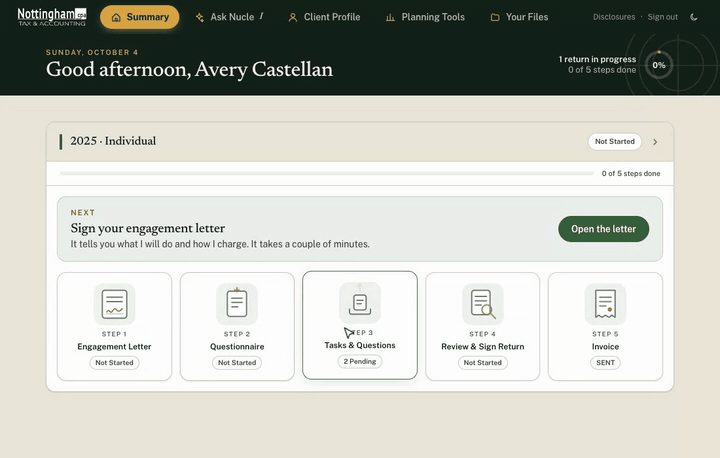
Start on your summary page
Each return you have with me shows as five steps: the engagement letter, a questionnaire, your list of documents and questions, review and signing, and the invoice. The card at the top tells you the one thing to do next.
Open the animation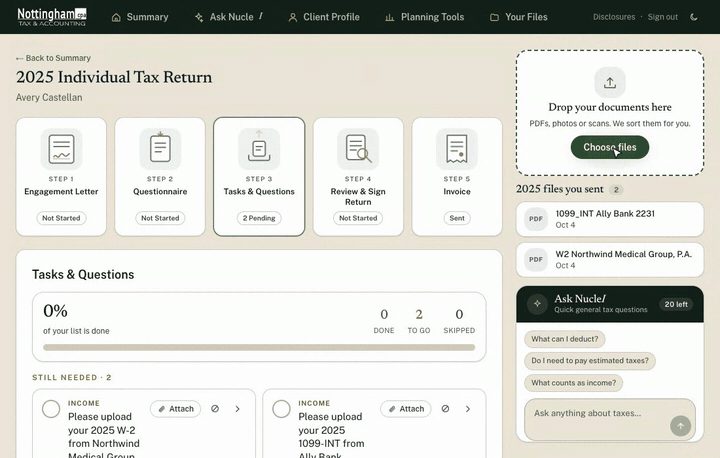
Send me your documents
Drop a file into the box on the right of any return, or tap Choose files. PDFs, photos and scans all work, and a phone picture of a document is fine. Please upload here rather than emailing documents; it keeps the year in one place and is safer.
Open the animation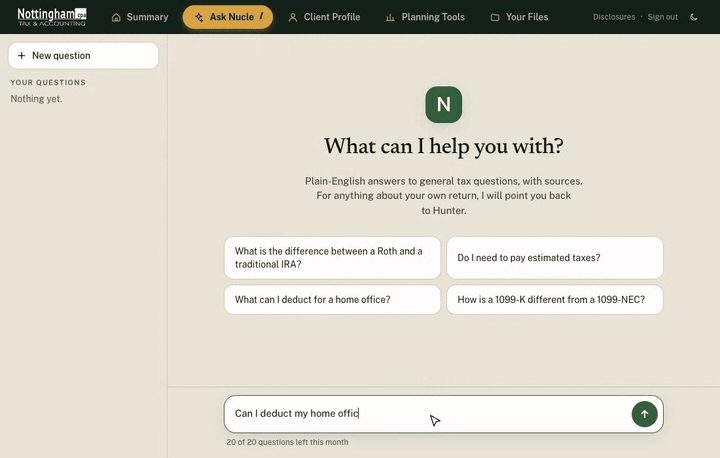
Ask NucleI a question
NucleI is the assistant in the portal. Ask a general tax question in plain English and it answers with sources. It does not know the details of your return and is not a substitute for me; anything that affects what you file, ask me. The answer in this recording is a sample.
Open the animationAsk NucleI
Ask NucleI is a research assistant inside the portal. You ask a tax question in plain language, it searches current guidance, and it answers with the sources cited underneath so you can expand them and read the authority yourself. That last part is the feature. An answer you cannot check is worth very little.
On cost, since the argument of this whole site is that how you are charged should be explained in advance: it is included. Nothing in the portal meters against your bill, and no question you ask there adds a line to your invoice. There is a usage quota and a saved history, so what it told you in February is still there in September. The limit on how many questions you can ask is shown in your account, on the screen.
The limits are worth saying out loud. It is a fast way to get oriented at eleven at night while you are staring at an IRS notice. It does not know the facts of your return, so it cannot tell you how a rule lands on your 1040. When the answer would change a number, ask me.
Your Files
Documents live in a vault organized in folders by tax year. Open 2025 and you get 2025: the W-2, the 1099-NEC from locum shifts, the Form 1098, the signed engagement letter. PDFs preview in the browser instead of making you download six files to find one, and multi-select handles a batch.
Every file carries a record of who uploaded it and when. That reads like housekeeping until March, when the live question is whether you sent me the K-1 or only meant to. It also means your documents never travel as email attachments, which is the least protected link in the chain and the one most firms still lean on. How the data is handled is on the security page.
Household accounts
A spouse's return, a college kid's first 1040, a parent whose filings you manage. Those sit under one login with an account switcher instead of three portals and three sets of credentials nobody can find in February. Each member keeps their own five steps and their own folders, and you move between them without logging out.
The rest of what is in there
- No password: enter your email and get a short code, or use Face ID or Touch ID after the first sign-in
- A spouse signs in with their own email address
- Client Profile: filing status, dependents, addresses, and the details I have on file
- Invoices in the portal, tied to the return they belong to
- A light and dark theme toggle
- A disclosures page covering how your information is handled
Security, without the adjectives
The portal logs you out after a stretch of inactivity. That is mildly irritating by design, and it exists because tax documents get opened on hospital workstations and airport wifi. Sensitive documents move through the portal or a secure upload link I send you, and I avoid email attachments in either direction.
Clients have my direct number for scheduling and short questions, and everyone else can use the contact form. Anything that matters to your return belongs in the portal, because a written channel with a record beats a voicemail neither of us can reference in June.
I can't get over how easy it was to work with Hunter. He's great at communicating with me and answered every question I had.
If you are not a client yet
The portal is where you land after the first conversation, not before it. That conversation carries no obligation. If you want the sequence from the outside first, how it works walks through intake to filing, and the pricing page explains how the number in that engagement letter gets set.
Questions, answered plainly.
How do I sign in to the portal?
Go to nottinghamcpa.taxnucleus.com and enter your email address. I send you a short code, and there is no password. After the first time you can use Face ID or Touch ID. If something does not work, send a note through the contact form and tell me which step.
Does the portal cost anything on top of my fee?
No. The number in your engagement letter is the number. Nothing in the portal, Ask NucleI included, meters against your bill or adds a line to your invoice.
Is Ask NucleI giving me tax advice?
No. It is a research tool that answers with citations you can open and verify, which makes it useful for orientation and for finding the underlying source fast. It does not know the specific facts of your return. Anything that would change a number on your return goes through me.
What happens to my documents after the return is filed?
They stay in the vault, in the folder for that tax year, so prior-year records are where you left them when a mortgage application or an IRS notice asks for them two years later. The retention rules behind that, from IRS Topic 305: three years is the standard period, six years if income was understated by more than 25 percent, and no limit at all if a return was never filed.
Let’s talk
Start with a conversation.
Tell me what's going on and I'll tell you plainly whether you need me.
Schedule a Conversation